Sebelum mulai
HappyMod didistribusikan sebagai file APK Android, so the installation flow is a little different from installing an app through Google Play. Use the official download page, keep your network connection stable, and only allow installation permission for the browser or file manager you are using right now.
- Unduh hanya dari happymod.studio atau tautan resmi di situs ini.
- Pastikan perangkat Android memiliki ruang cukup untuk APK dan data app.
- Jika Android menampilkan peringatan keamanan, baca dengan teliti dan lanjutkan hanya jika nama file cocok dengan HappyMod.
Pasang HappyMod dengan tangkapan layar
These screenshots show the normal Android installation path. Button labels may vary slightly by phone brand or Android version.
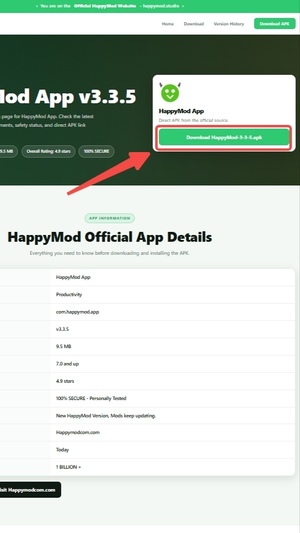
Unduh APK resmi
Buka halaman unduhan HappyMod dan ketuk tombol unduh APK. Wait until the browser finishes downloading the file before opening it.
- Do not rename the APK during download.
- If the download pauses, resume it from your browser downloads screen.
Buka file yang diunduh
After the APK is downloaded, tap the file from the browser notification, browser downloads list, or your phone file manager.
- The file should be a HappyMod APK package.
- If you cannot find it, check the Unduhan folder.
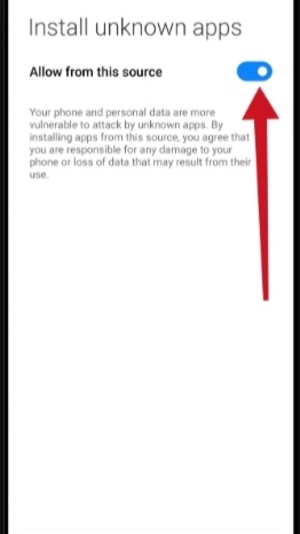
Izinkan instalasi dari sumber ini
If Android blocks the install, open the permission prompt and allow installation from the current browser or file manager. This permission is only needed so Android can install the APK.
- Grant permission only to the app you used to open the APK.
- You can turn this permission off again after installation.
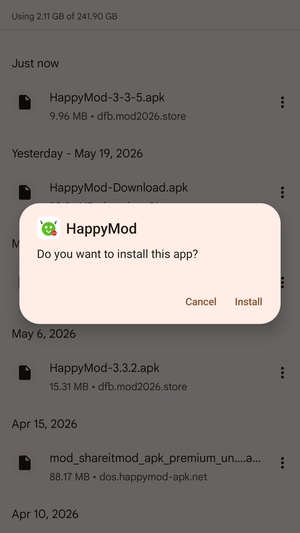
Instal dan buka HappyMod
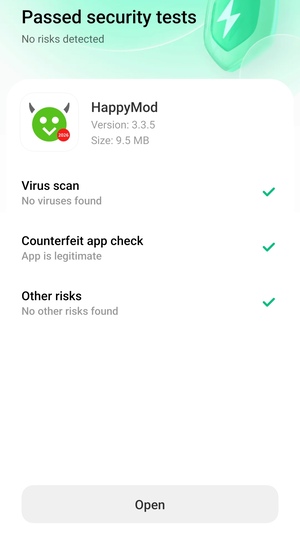
Return to the Instal APKer, tap Install, and wait for Android to finish. When installation is complete, tap Open to launch HappyMod.
- If the install button is unavailable, close screen overlays or floating apps and try again.
- If Android says the app was not installed, restart the phone and download a fresh copy.
Pemecahan masalah
- Unduhan gagal: beralih ke jaringan Wi-Fi atau seluler yang stabil, lalu unduh lagi dari halaman resmi.
- Tidak dapat membuka file: use your phone's Unduhan folder or file manager to find the APK.
- Instalasi diblokir: allow installation from the browser or file manager that opened the APK.
- App tidak terinstal: remove old incomplete APK files, restart Android, and try the latest version again.
FAQ instalasi
Apakah aman mengizinkan instalasi app tidak dikenal?
Android shows this prompt for APK files installed outside Google Play. Only allow it for the browser or file manager you used to open the official HappyMod APK, then disable the permission later if you prefer.
Mengapa ponsel saya menampilkan teks berbeda?
Samsung, Xiaomi, OPPO, vivo, Pixel, and other Android devices can use slightly different labels, but the flow is the same: download the APK, allow the source, install, then open.
Versi mana yang harus saya instal?
Sebagian besar pengguna sebaiknya memasang versi terbaru dari halaman unduhan resmi. Older versions are available from the version history page when you need a specific build.
Butuh bantuan?
Email kontak: support@happymod2026.com
Email keluhan: happymoddmc@outlook.com
Terakhir diperbarui: 20 Mei 2026